Posts

Showing posts with the label seo

Semantic Web still a pipe dream

Image
Eleven years ago Tim Berners-Lee said that the next logical step for the World Wide Web was  semantic . The idea was that one day machines could read and understand Web pages. Content would be tagged in a meaningful way: a date would be tagged as a date and an address as an address. Relevance would replace ambiguity. Finding, sharing and combining information would become easier. Today the semantic Web remains a pipe dream. Here is quick proof: When in Basel, Switzerland, go to Google News . Look at the top stories. See a bunch of stories about bank liquidity requirements? Minimum capital levels for financial institutions? How are these stories relevant to you being in Basel? They are not. Google is doing simple string matching. It detects your geographical location to Basel. It then finds news stories that say "Basel". It doesn't know that the Basel III agreement that regulates bank capital adequacy just happens to be named after the city ...

Link popularity

This post belongs to a series about  search engine optimization  (SEO) with Magnolia CMS. Today we look at increasing your site's link popularity. Search engines place strong emphasis on your site’s link popularity. Links from external sites, especially highly ranked ones, increase your site's rank. The more links targeting your site from external sources the better. There are countless ways to build links and a comprehensive discussion on this is beyond the scope of this paper. Some ways that Magnolia can help to build incoming links are: By developing a blog on an external domain to promote your main site. The Templating Kit allows you to manage multiple sites in a single instance . A forthcoming social media module will facilitate effortless integration with social media networks that have become a must for success on the Web. Social bookmarking provided in many Magnolia templates. Friendly URLs make creating external links intuitive and easy to create.

Keywords in page titles and meta elements

Image
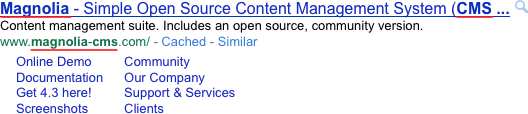
This post belongs to a series about  search engine optimization  (SEO) with Magnolia CMS. Today we look at inserting keywords in page titles and meta elements. Page titles are an extremely important SEO factor. Search engines give titles considerable algorithmic weight and use them as headings on search results. Titles should include keywords and, where appropriate, your company name for branding purposes: <title>Magnolia - Finance, Insurance & Banking</title> Description meta elements on the other hand do not add much to page relevance, but should not be neglected: <meta name="description" content="Magnolia's largest group of Enterprise Edition customers is from the..."> Their content often appears below the title in search results: The relevance of keywords stipulated in the keyword tag once had great impact, but this is no longer true. Actual page content is now far more relevant. Still, a keyword tag should be included: ...

Optimizing images

Image
This post belongs to a series about  search engine optimization  (SEO) with Magnolia CMS. Today we look at optimizing images. Great images enhance your site visually and enhance SEO rankings, provided they are properly optimized. Google and other search engines offer image-specific searches. A high rank in these searches increases your visibility. Search engines cannot read the content of images, and therefore must rely on accompanying text and tags. Best practices include: Image alt attributes with a short description of the image, for example.  Keyword-rich image file names. yellow-roses.jpg is far more descriptive and relevant than img003.jpg . Size and quality optimized for quick loading. Crisp, sharp images look better in thumbnails displayed in search results, and are more likely to be linked to by other webmasters. Captions that aptly describe the image assist vision-impaired users. Width and height specified in the element. Many browsers render a page ...

Redirecting traffic

Image
This post belongs to a series about  search engine optimization  (SEO) with Magnolia CMS. Today we look at redirecting traffic. Redirecting is the practice of sending requests to alternative destinations. Typical reasons to redirect are: Pages have moved due to site re-organization but search engines and users still have the old URLs in their indexes and bookmarks. Without redirection traffic going to the moved pages is lost to 404 errors. Identical URLs serving the same content lead to duplicate content issues as crawlers mistake each URL for a separate site. This is known as the "canonical URL issue" in SEO parlance. It is not uncommon to have example.com , www.example.com , and example.com/index.html deliver the same content. Sometimes there is a valid need to display the same content on multiple pages. These factors adversely affect SEO but they can be corrected by redirecting the incoming request to an alternative URL. There are several ways to redirect, but the ...

Categorizing content

Image
This post belongs to a series about  search engine optimization  (SEO) with Magnolia CMS. Today we look at categorizing content. Usability and SEO go hand-in-hand. Categorizing content allows visitors to find related and similar content with ease. Logical, keyword-rich categories provide intuitive navigation of a large collection of content. Categorization offers a range of opportunities to improve internal linking, visibility, and keyword density. Common uses of categories are tag clouds, and links to overview and landing pages. Although content tagging is an effective technique, tag clouds in particular have been abused. Bloggers saw them as a keyword-stuffing opportunity, and search engines have developed techniques to combat this trend. Magnolia allows you to create custom categorization taxonomies. You can tag articles with categories to support browsing of related content. This feature can be extended and adapted to suit your needs. By default, you can categ...

Preventing broken links

Image
This post belongs to a series about search engine optimization (SEO) with Magnolia CMS. Today we look at preventing broken links. Broken links can lower your site's rankings. Google mentions this specifically in its SEO guidelines . Broken links are also a source of irritation for users. While you have little control over changes to external links, you can inadvertently break internal links in a variety of ways, such as when changing site structure or deleting content that has incoming links. A process should be in place to regularly validate all links on a site. Magnolia has safeguards to prevent broken links: A hierarchical content store ensures that there are no orphaned pages that have no incoming links. All pages belong to a hierarchy, and each page has at least one incoming link - from its parent. Each page has a unique content ID for use as an internal link target. Dialogs provide a user-friendly browser for locating the target. Authors don't need to know the...

HTML links

Image
This post belongs to a series about search engine optimization (SEO) with Magnolia CMS. Today we look at inserting HTML links. Navigation links should be rendered as HTML to make them easy for crawlers to read. Search engines take the anchor text of a link into consideration when indexing it. Graphics and Flash objects, used by many designers to control look and feel, normally cannot be crawled. Alternative text descriptions should be provided. Use of uncrawlable elements also hinders users who do not have the required browser plug-ins. Since the navigation system is a site-wide collection of links to topics, links should be consistent throughout the site. Navigation is also a perfect opportunity to include descriptive keywords. The Magnolia Templating Kit offers four navigation structures out-of-the-box: horizontal, vertical, breadcrumbs, and meta-navigation. All of them render links as HTML. Consistent navigation is enforced throughout the site using the same template.

Shallow site architecture

Image
This post belongs to a series about  search engine optimization  (SEO) with Magnolia CMS. Today we look at providing a shallow site architecture. Site architecture is critical to SEO. Many sites grow organically and their architecture becomes a maze-like, illogical complex. A clear structure provides both the user and web crawler with a positive navigational experience. As a rule of thumb, the flatter the structure, the better. The higher a page appears in the site structure, the more likely it will be ranked high by a crawler. Crawlers seem to determine the depth of a page by the number of directories present in the URL, giving more relevance, for example, to /books/art than to /books/bestsellers/hardcover/art . A one or two layer limit is recommended, but for larger sites this is not always feasible. It is also important to maintain consistency throughout your site. All pages should follow the same format, and once established, you should endeavor to stick to the URL ...

Search-engine friendly URLs

Image
This post belongs to a series about  search engine optimization  (SEO) with Magnolia CMS. Today we look at creating search-engine friendly URLs. URLs are an important SEO element for search engines as well as users. Search engines are more likely to index static, short, clean URLs. Users appreciate their readability too. While most crawlers can follow dynamically generated URLs, there is evidence that when dynamic parameters are appended to a URL, the crawler only follows them to sites considered to have high importance. Request parameters should be avoided in the URL, as the crawler may view several URLs pointing to the same content as duplicates, lowering page rank. Good http://www.yoursite.com/books/hardcover Bad http://www.yoursite.com?p=72&s=0 Page URLs should: Include important keywords, as keywords are highlighted in search results. Most SEO experts agree that including them in a URL is important. Keywords also increase the likelihood of a visitor click...

Restricting crawler access

Image
This post belongs to a series about  search engine optimization  (SEO) with Magnolia CMS. Today we look at restricting crawler access. While SEO is mostly about about enticing that crawlers to your content, there are some pages you may not want them to access. These include administrative, password protected, and paid access pages. A robots.txt file restricts crawler access on a site-wide basis. The file is typically placed in the root directory of your site. All legitimate crawlers it check fro the presence of a robots.txt file, and respect the directives it contains. Even if you do not want to restrict access, it is advisable to include a robots.txt file because the absence of one has been known to produce a 404 error, resulting in none of your pages being crawled. This can also be the case if the file is not constructed correctly. Specific crawlers can also be denied access by entering their names or IP addresses in the file. The following example instructs all crawl...

Sitemaps

Image
This post belongs to a series about  search engine optimization  (SEO) with Magnolia CMS. Today we look at creating an XML sitemap. While most crawlers will find your site on their own, best practice is to keep them informed by providing an XML sitemap that lists your site's URLs. The document includes additional metadata about each page, such as when it was last updated, how often it changes, and its relative importance to other pages on your site. The Sitemaps XML protocol ( sitemaps.org ) is supported by all major search engines. You should include a reference to your sitemap's location in a robots.txt file. Magnolia's Google Sitemap module generates your sitemap XML document automatically. It finds all the pages on your site and allows you to easily set priority and change frequency in the user interface. No XML editing is necessary. Default values are provided should you prefer to tweak just the critical pages. The generated XML is compliant with the Sitem...

W3C compliant code

Image
This post belongs to a series about  search engine optimization (SEO) with Magnolia CMS. Today we look at creating W3C compliant code. In order to crawl and index a website, a search engine has to be able to read and interpret its code. A page coded in compliance with standards developed by the World Wide Web Consortium ( W3C ) is simpler for search engines to parse. The standards page at W3C lists more than 100 specifications, ranging from accessibility to XSLT. While this can seem overwhelming, four of the standards are key: Valid code (HTML, XML, XHTML) Semantically correct code CSS DOM and ECMAScript Valid code The Magnolia Templating Kit is a best-practice framework that produces valid XHTML. The templates can be used to build compelling websites quickly and efficiently without the need for technical expertise. The use of XHTML markup is declared with a DOCTYPE element, as you can see in the source code of any page created using a Magnolia template. The...

Search Engine Optimization

Image
This is the first post in a series on search engine optimization (SEO). I will be looking at key SEO factors identified by the SEOmoz.org consulting group and pitting them against Magnolia CMS , a Web content management system. This series should be interesting to online marketers, people employing web communications, and anyone looking to increase their site rank. Download all posts in a single PDF. What is SEO? The purpose of SEO is to enhance the volume and quality of traffic directed to a website via search engine results. Search engines aim to provide users with the most relevant results, while webmasters attempt to tweak their sites in order to move it up in the rankings and attract profitable, organic traffic. SEO began in the early 1990s, and quickly degenerated into a tug of war between search engines and webmasters. For each new weighting factor introduced by the engines, crafty webmasters invented means to circumvent it. As a result, many undeserving sites achi...